If you were using Ubuntu 9.10 (karmic) because you wanted to avoid some issues with Eclipse and Android ADT plugin that happened on newer versions on Ubuntu, well now is time to upgrade to the latest Ubuntu 10.10 (maverick) if you want to update to the latest Android 2.3 (gingerbread).
You may have discovered this after the update finished using Android SDK and AVD Manager tool and you sadly realize that your Android development environment was turned useless without a single word of warning. Latest Android SDK version depends on GLIBC_2.11 but it's no available for previous versions of Ubuntu, so unless you want to take the risk of using a different repository trying to find an update with unknown consequences to other components, upgrading is your only possible path.
If this is not a serious bug we should reconsider the definition of the word.
The origin of the problem is that Android SDK distribution is not package based and thus no dependencies are considered before updating the software. This is clearly a nonsense. Google has taken a completely different approach with Chrome which is cleverly distributed from a package repository as we can see in this screenshot of Ubuntu Software Center.
Android SDK must be distributed as packages as Chrome does, otherwise there is no way to prevent this problems happening again and again in the future. We are only scaring people away of Android development with this poor policies. It's true that the requirements page was updated and GLIBC 2.11 is listed now as a requirement, but when you discover it, it's too late. You expect some verifications done from software doing an update that cannot easily be reverted.
This is perhaps the most important bug, but there are others after upgrading to Ubuntu 10.10 (maverick) and Android SDK 2.3 (gingerbread) some other things are still broken, for example hierarchyviewer does not run out of the box and you have to manually copy some libraries,
Android SDK and AVD Manager updates some packages again an again ignoring they are already installed and some deficiencies of the Android ADT Layout editor, to name a few.
I complained about many things about Android in this blog and it seems that in one way or another they were fixed in following releases, so I hopefully think this would be the case.
Showing posts with label ubuntu. Show all posts
Friday, December 31, 2010
Friday, September 04, 2009
Android: Sharing your mobile connection with your computer (tethe
This post shows how easy is to share your mobile network to your Ubuntu 9.04 computer (should work with other Linux distributions as well) using your HTC Hero.
Tethering with no rooting, no drivers to install (as with other OSs), no complex settings...
Too boring, it just works.
enable mobile network sharing in your phone
| for this option to work USB cable must be connected |
that's all
Your phone was detected as an USB network adapter and NetworkManager did all the dirty work for you.Your computer is now connected to the mobile network !
Conclusion
If everything works just like that this blog would become very boring :-)
If you have comments, ideas, critiques or whatever just drop me a line or leave a comment in the blog.
Copyright © 2009 Diego Torres Milano. All rights reserved.
Tuesday, September 01, 2009
Fixing Android NDK permissions
Lately Linux is being treated more as a kind of Windows-like than a UNIX-like operating system it really is.
It seems that everybody has forgotten it is a multiuser operating system and most likely you don't want to install a single copy of every software just because some permissions are wrongly set mainly due to be distributed as a ZIP file which doesn't store this information.
Fixing Android SDK permissions was described in Ooops!..., they did it again. Here, we are fixing Android NDK permissions for your multi-user development environment.
Android NDK is a companion tool to the Android SDK that lets Android application developers build performance-critical portions of their apps in native code.
Other problem you may find during installation in Debian and Ubuntu is that Android NDK installation script invokes /bin/sh expecting to be bash. If you use bash syntax you should invoke it using /bin/bash. This problem will be fixed in next release.
Use this script to fix all of the problems, after unzipping as root:
It seems that everybody has forgotten it is a multiuser operating system and most likely you don't want to install a single copy of every software just because some permissions are wrongly set mainly due to be distributed as a ZIP file which doesn't store this information.
Fixing Android SDK permissions was described in Ooops!..., they did it again. Here, we are fixing Android NDK permissions for your multi-user development environment.
Android NDK is a companion tool to the Android SDK that lets Android application developers build performance-critical portions of their apps in native code.
Other problem you may find during installation in Debian and Ubuntu is that Android NDK installation script invokes /bin/sh expecting to be bash. If you use bash syntax you should invoke it using /bin/bash. This problem will be fixed in next release.
Use this script to fix all of the problems, after unzipping as root:
#! /bin/bashHope this helps.
NDK_DIR=${NDK_DIR:-/opt/android-ndk-1.5_r1}
sudo chmod a+rx $NDK_DIR
sudo find $NDK_DIR/ -type d -exec chmod a+rx {} \;
sudo find $NDK_DIR/ ! -perm -044 -exec chmod g+r,o+r {} \;
sudo find $NDK_DIR/ -type d -name bin -exec chmod -R a+x {} \;
[ ! -d $NDK_DIR/out/apps ] && sudo mkdir $NDK_DIR/out/apps
sudo chmod a+rwx $NDK_DIR/out/apps
( cd $NDK_DIR && sudo bash build/host-setup.sh )
Friday, January 02, 2009
Solved: Ubuntu 8.04 64 bit, Eclipse 3.4, Subclipse 1.4.7 and Subversion 1.5
A previous post, a possible solution to the problem of installing Subversion support in Eclipse 3.4 on Ubuntu 8.04 64 bit.
Although this worked much better Eclipse is still crashing under some operations. I've detected a problem while developing an android application, checked out from a subversion repository, when R.java is recreated causing Eclipse to crash.
This time, and convinced to find a solution or being forced to use Windows Vista as a development platform, I paid more attention to the crash log.
So, to obtain the solution, download jdk-6u11-linux-x64.bin from Sun and install it.
Next step is to tell Eclipse to use this newly installed java.
Edit eclipe.ini and add these lines
Problem solved !
No crashes till now...
Although this worked much better Eclipse is still crashing under some operations. I've detected a problem while developing an android application, checked out from a subversion repository, when R.java is recreated causing Eclipse to crash.
This time, and convinced to find a solution or being forced to use Windows Vista as a development platform, I paid more attention to the crash log.
#As we can see, the problem is not in subclipse or subversive but in the java virtual machine. It's true, that the problem only showed up when we use subversion, but this is another story.
# An unexpected error has been detected by Java Runtime Environment:
#
# SIGSEGV (0xb) at pc=0x00007fbacc7e525a, pid=29545, tid=1098688848
#
# Java VM: Java HotSpot(TM) 64-Bit Server VM (10.0-b23 mixed mode linux-amd64)
# Problematic frame:
# V [libjvm.so+0x1f125a]
#
# If you would like to submit a bug report, please visit:
# http://java.sun.com/webapps/bugreport/crash.jsp
# The crash happened outside the Java Virtual Machine in native code.
# See problematic frame for where to report the bug.
#
--------------- T H R E A D ---------------
Current thread (0x00000000401a7400): JavaThread "CompilerThread1" daemon [_thread_in_native, id=29552, stack(0x00000000416ca000,0x00000000417cb000)]
siginfo:si_signo=SIGSEGV: si_errno=0, si_code=1 (SEGV_MAPERR), si_addr=0x0000000000000000
Registers:
RAX=0x0000000000000000, RBX=0x00007fba8c561068, RCX=0x00007fba9a4ef5b0, RDX=0x0000000000000050
RSP=0x00000000417c6d70, RBP=0x00000000417c6de0, RSI=0x00007fba9a4ef5b0, RDI=0x00007fba8c561068
R8 =0x00007fba9a4ef608, R9 =0x00007fba9a4ef5b0, R10=0x00007fba9a4ef5b0, R11=0x0000000000000000
R12=0x00007fba8c561030, R13=0x0000000000000000, R14=0x0000000040162f50, R15=0x0000000000000001
RIP=0x00007fbacc7e525a, EFL=0x0000000000010246, CSGSFS=0x0000000000000033, ERR=0x0000000000000004
TRAPNO=0x000000000000000e
Top of Stack: (sp=0x00000000417c6d70)
0x00000000417c6d70: 00007fba9b0d1358 00000001ffffffff
0x00000000417c6d80: 00007fba9a4ef5b0 00000002cc789361
0x00000000417c6d90: 00007fba9b0d1350 00000007417c79a0
0x00000000417c6da0: 00000000417c7a68 01000000000005d2
0x00000000417c6db0: 00000000417c79a0 00007fbacce2e970
0x00000000417c6dc0: 00000000417c79a0 00000000417c6f30
0x00000000417c6dd0: 00000000417c6ef0 00000000417c6ec0
0x00000000417c6de0: 00000000417c7000 00007fbacc7e479c
0x00000000417c6df0: 00000000417c7a68 00000000417c6fb0
0x00000000417c6e00: 00007fba8c3e8010 00007fba8c000020
0x00000000417c6e10: 00000000417c6e80 00007fbacce47d70
0x00000000417c6e20: 00007fba8c104a50 0000000000000174
0x00000000417c6e30: 00000000417c7ac0 00007fbaccfe6c1c
0x00000000417c6e40: 00000000417ca950 00000000417c6e80
0x00000000417c6e50: 00007fbacce4a4e0 00007fba9a80ff90
0x00000000417c6e60: 0000000000000174 00007fbaccc1edf2
0x00000000417c6e70: 0000000040111030 00007fbaccc1eec1
0x00000000417c6e80: 00000000417ca950 00000000417c6ec0
0x00000000417c6e90: 00007fbacce4a4e0 0000000000007fe8
0x00000000417c6ea0: 00007fba8c39f620 00007fbaccc1edf2
0x00000000417c6eb0: 0000000040111030 00007fbaccc1eec1
0x00000000417c6ec0: 00007fbacce2e970 00007fba0000000e
0x00000000417c6ed0: 00000000417c9350 00000000417c79a0
0x00000000417c6ee0: 0000000000000a05 00000000401a79a0
0x00000000417c6ef0: 000000000000000d 00000000417c9350
0x00000000417c6f00: 00007fba8c5bad00 00007fbacc788d00
0x00000000417c6f10: 00007fba8c54f5a0 00000000000005d3
0x00000000417c6f20: 00000000417c6fb0 00007fba8c11dc70
0x00000000417c6f30: 000000000000000c 00000000417c9350
0x00000000417c6f40: 00007fba8c19c360 00007fba8c2d3790
0x00000000417c6f50: 00007fba8c0d9750 00007fba8c0da3b0
0x00000000417c6f60: 00007fba9bd08e60 00000000417c7ac0
Instructions: (pc=0x00007fbacc7e525a)
0x00007fbacc7e524a: 48 89 cf 41 ff 95 80 00 00 00 48 89 df 49 89 c5
0x00007fbacc7e525a: 8b 00 41 21 44 24 38 41 8b 45 04 21 43 04 41 8b
Stack: [0x00000000416ca000,0x00000000417cb000], sp=0x00000000417c6d70, free space=1011k
Native frames: (J=compiled Java code, j=interpreted, Vv=VM code, C=native code)
V [libjvm.so+0x1f125a]
V [libjvm.so+0x1f079c]
V [libjvm.so+0x2445f5]
V [libjvm.so+0x241105]
V [libjvm.so+0x1e05f7]
V [libjvm.so+0x248f98]
V [libjvm.so+0x248936]
V [libjvm.so+0x62a819]
V [libjvm.so+0x624ac1]
V [libjvm.so+0x50630a]
Current CompileTask:
C2:1124 org.eclipse.core.internal.dtree.DataTreeNode.forwardDeltaWith([Lorg/eclipse/core/internal/dtree/AbstractDataTreeNode;[Lorg/eclipse/core/internal/dtree/AbstractDataTreeNode;Lorg/eclipse/core/internal/dtree/IComparator;)[Lorg/eclipse/core/internal/dtree/AbstractDataTreeNode; (469 bytes)
--------------- P R O C E S S ---------------
Java Threads: ( => current thread )
0x00007fbaa47d7800 JavaThread "org.eclipse.jdt.internal.ui.text.JavaReconciler" daemon [_thread_blocked, id=30170, stack(0x0000000041d08000,0x0000000041e09000)]
0x0000000040347000 JavaThread "Worker-11" [_thread_blocked, id=30132, stack(0x0000000040e0c000,0x0000000040f0d000)]
0x00007fba9c43c400 JavaThread "Worker-10" [_thread_blocked, id=30131, stack(0x000000004100e000,0x000000004110f000)]
0x00007fba9bec9800 JavaThread "Worker-9" [_thread_blocked, id=29647, stack(0x0000000041210000,0x0000000041311000)]
0x00007fbaa69c5c00 JavaThread "SVN Kit 1.2 Connector" [_thread_blocked, id=29611, stack(0x000000004245a000,0x000000004255b000)]
0x00007fba9becf800 JavaThread "Thread-14" [_thread_blocked, id=29609, stack(0x0000000042359000,0x000000004245a000)]
0x00007fbaa623a000 JavaThread "Timer-1" [_thread_blocked, id=29607, stack(0x000000004110f000,0x0000000041210000)]
0x00007fbaa43b9000 JavaThread "Worker-8" [_thread_blocked, id=29602, stack(0x0000000042258000,0x0000000042359000)]
0x00007fba9dda5400 JavaThread "Worker-7" [_thread_blocked, id=29601, stack(0x0000000040f0d000,0x000000004100e000)]
0x00007fba9dcd9400 JavaThread "Worker-6" [_thread_in_vm, id=29600, stack(0x0000000041bcf000,0x0000000041cd0000)]
0x00007fba9beec800 JavaThread "Worker-4" [_thread_blocked, id=29598, stack(0x0000000042056000,0x0000000042157000)]
0x00007fbaa498d800 JavaThread "Timer-0" [_thread_blocked, id=29592, stack(0x000000004074d000,0x000000004084e000)]
0x00007fba9af2a800 JavaThread "Device List Monitor" daemon [_thread_in_native, id=29591, stack(0x0000000042157000,0x0000000042258000)]
0x00007fba9da2b800 JavaThread "Monitor" daemon [_thread_in_native, id=29574, stack(0x0000000041f55000,0x0000000042056000)]
0x00007fba9c3e5800 JavaThread "org.eclipse.jdt.internal.ui.text.JavaReconciler" daemon [_thread_blocked, id=29571, stack(0x000000004064c000,0x000000004074d000)]
0x00007fbaa5500800 JavaThread "Java indexing" daemon [_thread_blocked, id=29569, stack(0x0000000041e54000,0x0000000041f55000)]
0x0000000040378c00 JavaThread "Start Level Event Dispatcher" daemon [_thread_blocked, id=29561, stack(0x000000004054b000,0x000000004064c000)]
0x000000004031d800 JavaThread "Framework Event Dispatcher" daemon [_thread_blocked, id=29560, stack(0x0000000041ace000,0x0000000041bcf000)]
0x0000000040437400 JavaThread "State Data Manager" daemon [_thread_blocked, id=29559, stack(0x00000000419cd000,0x0000000041ace000)]
0x00000000401a9000 JavaThread "Low Memory Detector" daemon [_thread_blocked, id=29553, stack(0x00000000417cb000,0x00000000418cc000)]
=>0x00000000401a7400 JavaThread "CompilerThread1" daemon [_thread_in_native, id=29552, stack(0x00000000416ca000,0x00000000417cb000)]
0x000000004019bc00 JavaThread "CompilerThread0" daemon [_thread_blocked, id=29551, stack(0x00000000415c9000,0x00000000416ca000)]
0x000000004019a400 JavaThread "Signal Dispatcher" daemon [_thread_blocked, id=29550, stack(0x00000000414c8000,0x00000000415c9000)]
0x0000000040176400 JavaThread "Finalizer" daemon [_thread_blocked, id=29549, stack(0x000000004097a000,0x0000000040a7b000)]
0x0000000040175000 JavaThread "Reference Handler" daemon [_thread_blocked, id=29548, stack(0x0000000040879000,0x000000004097a000)]
0x0000000040113000 JavaThread "main" [_thread_in_vm, id=29546, stack(0x00000000413c7000,0x00000000414c8000)]
Other Threads:
0x000000004016fc00 VMThread [stack: 0x0000000040b09000,0x0000000040c0a000] [id=29547]
0x00000000401ab000 WatcherThread [stack: 0x00000000418cc000,0x00000000419cd000] [id=29554]
VM state:not at safepoint (normal execution)
VM Mutex/Monitor currently owned by a thread: None
Heap
def new generation total 42496K, used 9220K [0x00007fbaa84d0000, 0x00007fbaab2e0000, 0x00007fbaada20000)
eden space 37824K, 14% used [0x00007fbaa84d0000, 0x00007fbaa8a53ac0, 0x00007fbaaa9c0000)
from space 4672K, 76% used [0x00007fbaaa9c0000, 0x00007fbaaad3d7b0, 0x00007fbaaae50000)
to space 4672K, 0% used [0x00007fbaaae50000, 0x00007fbaaae50000, 0x00007fbaab2e0000)
tenured generation total 94144K, used 48464K [0x00007fbaada20000, 0x00007fbab3610000, 0x00007fbab84d0000)
the space 94144K, 51% used [0x00007fbaada20000, 0x00007fbab0974090, 0x00007fbab0974200, 0x00007fbab3610000)
compacting perm gen total 86016K, used 85928K [0x00007fbab84d0000, 0x00007fbabd8d0000, 0x00007fbac84d0000)
the space 86016K, 99% used [0x00007fbab84d0000, 0x00007fbabd8ba3b8, 0x00007fbabd8ba400, 0x00007fbabd8d0000)
No shared spaces configured.
Dynamic libraries:
40000000-40009000 r-xp 00000000 08:05 424775 /usr/lib/jvm/java-6-sun-1.6.0.07/jre/bin/java
40108000-4010a000 rwxp 00008000 08:05 424775 /usr/lib/jvm/java-6-sun-1.6.0.07/jre/bin/java
4010a000-4054b000 rwxp 4010a000 00:00 0 [heap]
4054b000-4054e000 ---p 4054b000 00:00 0
4054e000-4064c000 rwxp 4054e000 00:00 0
4064c000-4064f000 ---p 4064c000 00:00 0
...
VM Arguments:
jvm_args: -Djava.library.path=/usr/share/java/ -Djava.library.path=/usr/lib/jni/ -Dosgi.requiredJavaVersion=1.5 -Xms40m -Xmx256m -XX:MaxPermSize=256m
java_command: /opt/java/eclipse-3.4/plugins/org.eclipse.equinox.launcher_1.0.101.R34x_v20080819.jar -os linux -ws gtk -arch x86_64 -showsplash -launcher /opt/java/eclipse-3.4/eclipse -name Eclipse --launcher.library /opt/java/eclipse-3.4/plugins/org.eclipse.equinox.launcher.gtk.linux.x86_64_1.0.101.R34x_v20080731/eclipse_1115.so -startup /opt/java/eclipse-3.4/plugins/org.eclipse.equinox.launcher_1.0.101.R34x_v20080819.jar -exitdata 1190018 -vm /usr/bin/java -vmargs -Djava.library.path=/usr/share/java/ -Djava.library.path=/usr/lib/jni/ -Dosgi.requiredJavaVersion=1.5 -Xms40m -Xmx256m -XX:MaxPermSize=256m -jar /opt/java/eclipse-3.4/plugins/org.eclipse.equinox.launcher_1.0.101.R34x_v20080819.jar
Launcher Type: SUN_STANDARD
Environment Variables:
PATH=/home/diego/bin:/usr/local/sbin:/usr/local/bin:/usr/sbin:/usr/bin:/sbin:/bin:/usr/games
USERNAME=diego
LD_LIBRARY_PATH=/usr/lib/jvm/java-6-sun-1.6.0.07/jre/lib/amd64/server:/usr/lib/jvm/java-6-sun-1.6.0.07/jre/lib/amd64:/usr/lib/jvm/java-6-sun-1.6.0.07/jre/../lib/amd64:/usr/lib64/xulrunner-addons
SHELL=/bin/bash
DISPLAY=:0.0
Signal Handlers:
SIGSEGV: [libjvm.so+0x661750], sa_mask[0]=0x7ffbfeff, sa_flags=0x10000004
SIGBUS: [libjvm.so+0x661750], sa_mask[0]=0x7ffbfeff, sa_flags=0x10000004
SIGFPE: [libjvm.so+0x504550], sa_mask[0]=0x7ffbfeff, sa_flags=0x10000004
SIGPIPE: SIG_IGN, sa_mask[0]=0x00000000, sa_flags=0x00000000
SIGXFSZ: [libjvm.so+0x504550], sa_mask[0]=0x7ffbfeff, sa_flags=0x10000004
SIGILL: [libjvm.so+0x504550], sa_mask[0]=0x7ffbfeff, sa_flags=0x10000004
SIGUSR1: SIG_DFL, sa_mask[0]=0x00000000, sa_flags=0x00000000
SIGUSR2: [libjvm.so+0x5067c0], sa_mask[0]=0x00000000, sa_flags=0x10000004
SIGHUP: [libjvm.so+0x506520], sa_mask[0]=0x7ffbfeff, sa_flags=0x10000004
SIGINT: [libjvm.so+0x506520], sa_mask[0]=0x7ffbfeff, sa_flags=0x10000004
SIGTERM: [libjvm.so+0x506520], sa_mask[0]=0x7ffbfeff, sa_flags=0x10000004
SIGQUIT: [libjvm.so+0x506520], sa_mask[0]=0x7ffbfeff, sa_flags=0x10000004
--------------- S Y S T E M ---------------
OS:lenny/sid
uname:Linux 2.6.24-22-generic #1 SMP Mon Nov 24 19:35:06 UTC 2008 x86_64
libc:glibc 2.7 NPTL 2.7
rlimit: STACK 8192k, CORE 0k, NPROC 12221, NOFILE 1024, AS infinity
load average:0.49 0.31 0.27
CPU:total 2 (2 cores per cpu, 1 threads per core) family 6 model 15 stepping 6, cmov, cx8, fxsr, mmx, sse, sse2, sse3, ssse3
Memory: 4k page, physical 1537752k(21980k free), swap 3148700k(3103580k free)
vm_info: Java HotSpot(TM) 64-Bit Server VM (10.0-b23) for linux-amd64 JRE (1.6.0_07-b06), built on Jun 10 2008 01:53:27 by "java_re" with gcc 3.2.2 (SuSE Linux)
time: Mon Dec 29 22:56:29 2008
elapsed time: 490 seconds
So, to obtain the solution, download jdk-6u11-linux-x64.bin from Sun and install it.
Next step is to tell Eclipse to use this newly installed java.
Edit eclipe.ini and add these lines
-showsplash
org.eclipse.platform
-vm
/opt/java/jdk1.6/bin/java
-vmargs
-Djava.library.path=/usr/share/java/
-Djava.library.path=/usr/lib/jni/
-Dosgi.requiredJavaVersion=1.5
-Xms40m
-Xmx256m
-XX:MaxPermSize=256m
Problem solved !
No crashes till now...
Sunday, December 28, 2008
Ubuntu 8.04 64 bit, Eclipse 3.4, Subclipse 1.4.7 and Subversion 1.5
How to get these working together ?
Firstly, it's incredible that such a simple thing requires such a big amount of research, trial and error and frustration when should work out-of-the-box.
I'm writing this post hoping to save somebody else precious development time.
Introduction
Subclipse 1.4.7 requires Subversion 1.5 which is not available in normal Ubuntu repositories.
Eclipse just crashes using other combinations, in this environment.
Subversion 1.5
Install subversion 1.5 from Ubuntu backports. Just download the required packages and install them, there's no need to enable backports repository just for this.
Download the following packages:
Subclipse 1.4.7
Add http://subclipse.tigris.org/update_1.4.x site to Eclipse and install Subclipse 1.4.7, Subversion Client Adapter 1.5.2 and Subversion Native Client Library Adapter (JavaHL) 1.5.5
Configuring Eclipse 3.4
If you try to use Subversion in Eclipse you will receive and error, because the Subversion JNI libraries are not detected.
To achieve thisd you have to edit eclipse.ini (the path depends on where you've decided to install it, as it's not installed from deb packages)
Add these two lines (this is the little magic)
and, after restarting Eclipse, you will be able to use Subversion.
Verify that under SVN Interface the correct JavaHL version is detected in Window -> Preferences -> Team -> SVN.
Firstly, it's incredible that such a simple thing requires such a big amount of research, trial and error and frustration when should work out-of-the-box.
I'm writing this post hoping to save somebody else precious development time.
Introduction
Subclipse 1.4.7 requires Subversion 1.5 which is not available in normal Ubuntu repositories.
Eclipse just crashes using other combinations, in this environment.
Subversion 1.5
Install subversion 1.5 from Ubuntu backports. Just download the required packages and install them, there's no need to enable backports repository just for this.
Download the following packages:
- subversion (> 1.5)
- libsvn1 (>1.5)
- libsvn-java (>1.5)
$ sudo dpkg --install libsvn-java_1.5.1dfsg1-1ubuntu2_amd64.deb \
libsvn1_1.5.1dfsg1-1ubuntu2_amd64.deb \
subversion_1.5.1dfsg1-1ubuntu2_amd64.deb
Subclipse 1.4.7
Add http://subclipse.tigris.org/update_1.4.x site to Eclipse and install Subclipse 1.4.7, Subversion Client Adapter 1.5.2 and Subversion Native Client Library Adapter (JavaHL) 1.5.5
Configuring Eclipse 3.4
If you try to use Subversion in Eclipse you will receive and error, because the Subversion JNI libraries are not detected.
To achieve thisd you have to edit eclipse.ini (the path depends on where you've decided to install it, as it's not installed from deb packages)
Add these two lines (this is the little magic)
-showsplash
org.eclipse.platform
-vmargs
-Djava.library.path=/usr/share/java/
-Djava.library.path=/usr/lib/jni/
-Dosgi.requiredJavaVersion=1.5
-Xms40m
-Xmx256m
-XX:MaxPermSize=256m
and, after restarting Eclipse, you will be able to use Subversion.
Verify that under SVN Interface the correct JavaHL version is detected in Window -> Preferences -> Team -> SVN.
Friday, November 30, 2007
javax.xml.ws.soap.SOAPFaultException: ERROR: No security header found

Here using Netbeans 6.0rc2 and Glassfish 2 (Sun Java System Application Server 9.1 (build b58g-fcs)) that came bundled in Netbeans download, using java version 1.6.0_03 on Ubuntu 7.10 gusty.
The SecureCalculatorApp and SecureCalculatorClientApp sample applications (New Project->Samples->Web Services->Secure Calculator) work perfect. However, if you try to develop and run a Java destkop application client to consume the CalculatorWS web service in SecureCalculatorApp you obtain
javax.xml.ws.soap.SOAPFaultException: ERROR: No security header found in the message
There are some posts with comments and solutions, but sometimes they don't apply exactly to these software versions, or even worst, sometimes it's not completely clear which versions they are related to. To avoid confusion, the versions I've been testing are clearly stated before.
You can download the full example from [here]. Then Build and Run.
Don't replace or update the certificates in Glassfish because it's not necessary, at least in the scope of this example.
Open the project properties and under lib
- Remove JAX-WS 2.1
- Add from Glassfish lib directories
- webservices-rt.jar
- appserv-rt.jar
- javaee.jar
- webservices-tools.jar
- endorsed/activation.jar
- endorsed/webservices-api.jar
Rebuild the project, and hopefully everything will work fine. Obviously, SecureCalculatorApp must be deployed for this example to work.
Troubleshooting
If something goes wrong, for example you are receiving an exception like this
Nov 30, 2007 2:32:20 PM [com.sun.xml.ws.policy.jaxws.PolicyConfigParser] parse
INFO: WSP1049: Loaded WSIT configuration from file: file:/home/diego/tmp/NetBeansProjects/SecureCalculatorGUI/build/classes/META-INF/wsit-client.xml
Nov 30, 2007 2:32:21 PM com.sun.xml.wss.jaxws.impl.SecurityPipeBase populateTruststoreProps
SEVERE: WSSPIPE0016: TrustStore URL was obtained as NULL from ConfigAssertion.
You may need to verify your Security settings in the Web Service Reference.
Right click on CalculatorWSService and open Edit Web Serice Attributes and verify these settings.

and clicking Truststore..., verify that Location points to

As usual, the password is changeit.
Hope this helps and saves you time looking into the wrong direction.
Comments, suggestions, fixes, etc. are gladly welcome.
Labels:
Glassfish,
java,
NetBeans,
ubuntu,
Web services
Tuesday, April 10, 2007
Citrix ICA Client 10 and Ubuntu

If you have downloaded and installed the new Citrix ICA Client 10 in Ubuntu 6.10 Edgy Eft you may have already discovered that it doesn't work out of the box.
You may receive some font errors or missing dependencies, and because Citrix doesn't provide a DEB package these missing dependencies are not detected by the tar.gz package installer.
To simplify the installation, or better the post-install steps, I've made a script available at http://codtech.com/downloads/citrix-icaclient-10-ubuntu which verifies that dependencies packages are installed and patch the configuration files to get rid of the error with UTF fonts.
Download the script, and if Citrix is installed in a system location use sudo to run it.
Don't forget to set ICAROOT in the environment if it's not /usr/lib/ICAClient.
Comments are welcome.
Friday, June 02, 2006
Ubuntu 6.06 LTS

Now testing Ubuntu 6.06 LTS, which was released yesterday, and I'm very satisfied. I was always a RedHat/Fedora kind of guy, but anyway I liked latest Ubuntu a lot.
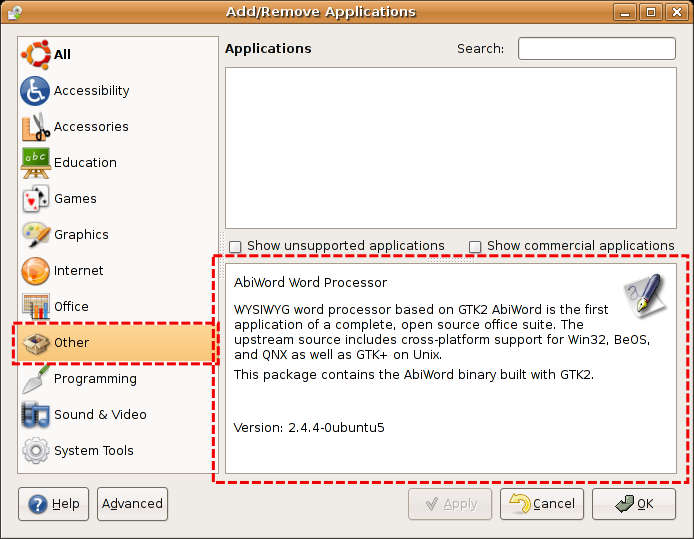
gnome-app-install small bug
During the tests I've found a small bug in gnome-app-install, there's no need to say that the gnome-app-install/synaptic combination is much, much better that Fedora's pup/pirut.
The problem is that everytime you select an empty category, the information from the previous package is still displayed because the blank page fails.
Well, as I found this problem I wrote a small patch for the gnome-app-install application that solves it.
I'm filling the bug report right now (filled under BUG #48044).
The patch can be found here: http://dtmilano.googlepages.com/gnome-app-install-blank_page.patch
Subscribe to:
Posts (Atom)